
Playground: Under the Hood
The playground lets you type a grammar, edit test input, and watch the parse happen step by step — all in the browser, with no build step. This page explains how that works.
The data flow
Grammar source text (on each keystroke, debounced 300 ms)
  → EBNFParser.parse() / ABNFParser.parse()
  → on error: Monaco setModelMarkers → inline squiggles in editor
  → on success: GrammarAST

GrammarAST (on Compile)
  → GrammarInterpreter + TraceObserver
  → ParseEvent[]
  → Debug UI (step through, call stack, position highlight, trace log)
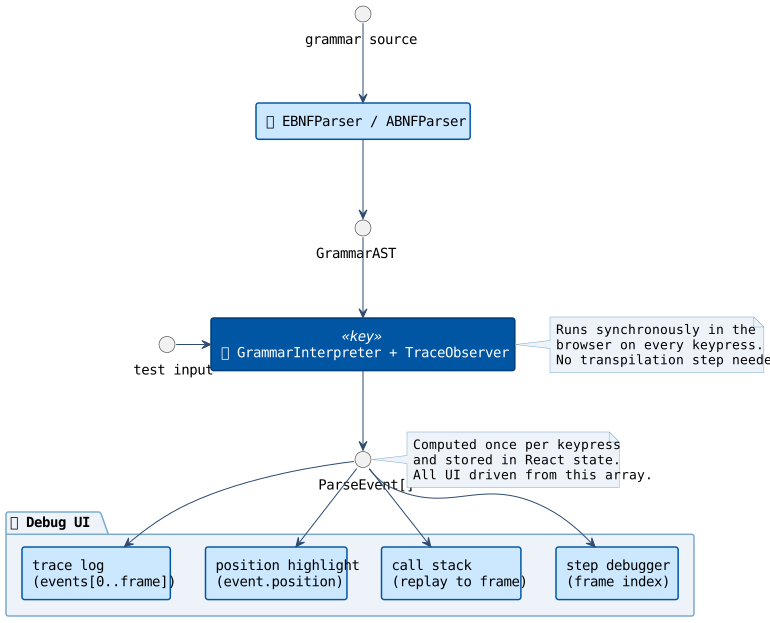
Everything runs synchronously in the browser on each keystroke.
Live grammar validation
As you type in the grammar editor, the playground validates your grammar
continuously — 300 ms after each keystroke — using the same EBNFParser or
ABNFParser that the Compile button invokes. Syntax errors appear as inline
red squiggles directly in the editor, with the full error message on hover. No
button press needed.
// runs on every change, debounced 300 ms
const ast = EBNFParser.parse(draft) // throws RDParserException on bad syntaxRDParserException messages always end with at position N, where N is the
byte offset of the furthest point the parser reached before failing. The
playground converts that offset to a Monaco line/column marker:
function byteOffsetToLineCol(source: string, byteOffset: number) {
  const encoded   = new TextEncoder().encode(source)
  const textBefore = new TextDecoder().decode(encoded.slice(0, byteOffset))
  const lines = textBefore.split('\n')
  return { lineNumber: lines.length, column: lines.at(-1)!.length + 1 }
}The marker is registered via Monaco's editor.setModelMarkers API under the
owner key 'grammar-lint', so it is cleared automatically when the grammar
becomes valid again. If the grammar parses successfully but contains no rules,
a yellow warning marker spans the entire document instead.
Step 1 — parse the grammar source into an AST
When you type in the grammar editor and click Compile, the playground calls the
same parser that rdp-gen uses internally:
import { EBNFParser } from '@configuredthings/rdp.js/generator'

const ast = EBNFParser.parse(grammarSource) // → GrammarASTGrammarAST is a plain data structure — a list of rules, each with a name and a
body describing the production in terms of terminals, non-terminals, sequences,
alternations, repetitions, and so on. For example, the two-rule grammar
Number = Digit, {Digit};
Digit  = '0' | '1';
produces:
{
  "rules": [
    {
      "name": "Number",
      "body": {
        "kind": "sequence",
        "items": [
          { "kind": "nonTerminal", "name": "Digit" },
          {
            "kind": "zeroOrMore",
            "item": { "kind": "nonTerminal", "name": "Digit" }
          }
        ]
      }
    },
    {
      "name": "Digit",
      "body": {
        "kind": "alternation",
        "items": [
          { "kind": "terminal", "value": "0" },
          { "kind": "terminal", "value": "1" }
        ]
      }
    }
  ]
}The full discriminated union of kind values is defined in
src/generator/ast.ts:
sequence, alternation, optional, zeroOrMore, oneOrMore, nonTerminal,
terminal, exception (EBNF), and charValue, coreRule, repetition (ABNF).
GrammarInterpreter and codegen.ts both operate on this same structure — they
are format-agnostic once the grammar source has been parsed.
You can inspect the AST for any grammar with the --ast-only flag:
rdp-gen grammar.ebnf --ast-onlyStep 2 — run an interpreted parse
The playground does not execute the generated TypeScript parser.
Instead it uses GrammarInterpreter, a runtime interpreter that walks the
GrammarAST directly against the encoded input bytes:
import { GrammarInterpreter } from '@configuredthings/rdp.js/interpreter'
import { TraceObserver }      from '@configuredthings/rdp.js/observable'

function runParse(expr: string, ast: GrammarAST) {
  const bytes    = new TextEncoder().encode(expr)
  const data     = new DataView(bytes.buffer)
  const observer = new TraceObserver()
  const parser   = new GrammarInterpreter(ast, data)
  parser.withObserver(observer)
  const valid = parser.parse()
  return { trace: observer.events, valid }
}GrammarInterpreter extends ObservableRDParser, so it has the full observer
infrastructure built in. Attaching a TraceObserver before calling parse()
captures every production entry and exit as a ParseEvent.
Step 3 — collect a ParseEvent trace
TraceObserver accumulates events into an array:
type ParseEvent =
  | { kind: 'enter'; production: string; position: number }
  | { kind: 'exit';  production: string; position: number; matched: boolean }
| { kind: 'error'; message: string; position: number }One event is appended each time the interpreter enters or exits a production rule
method. For the arithmetic grammar parsing 3 + 4, a typical trace looks like:
enter  expr     pos:0
enter  term     pos:0
enter  factor   pos:0
enter  number   pos:0
enter  digit    pos:0
exit   digit    matched  pos:1
enter  digit    pos:1
exit   digit    failed   pos:1
exit   number   matched  pos:1
exit   factor   matched  pos:1
exit   term     matched  pos:1
...
This array is computed once per keypress and stored in React state. Nothing else re-runs the parser — the entire debug UI is driven by walking this array.
Step 4 — power the debug UI from the trace
The step-through debugger is just an index into ParseEvent[]. Pressing Step
increments the index by one. Play starts an interval timer that auto-increments it
at 120 ms per frame.
The call stack is reconstructed on each frame by replaying events from index 0 to the current index:
const stack: string[] = []
for (let i = 0; i <= frame; i++) {
  const ev = events[i]
  if (ev.kind === 'enter') stack.push(ev.production)
  else if (ev.kind === 'exit') stack.pop()
}
// stack = ['expr', 'term', 'factor', ...]The position highlight on the input string is currentEvent.position — the
byte offset the interpreter had reached when the event fired. No re-parsing needed;
the position was captured at trace time.
The trace log renders events.slice(0, currentFrame + 1) — events revealed so
far — and auto-scrolls to keep the current entry in view.
The generated TypeScript panel
Clicking Compile also calls generateParser() with observable: true and
displays the resulting TypeScript source in the right-hand panel:
import { generateParser } from '@configuredthings/rdp.js/generator'

const ts = generateParser(grammarSource, {
  format: 'ebnf',
  parserName: 'CustomParser',
  observable: true,
})
// → TypeScript string shown in the editor panelThis TypeScript is not executed by the playground. It is shown for educational
purposes — so you can see exactly what rdp-gen would produce and copy it into
your own project. The live parsing and debugging always go through
GrammarInterpreter.
Why GrammarInterpreter instead of the generated parser?
Running the generated TypeScript at runtime would require transpiling it in the
browser (a TypeScript compiler invocation per grammar change), then eval-ing the
result. GrammarInterpreter sidesteps all of that: it reads the same GrammarAST
that the code generator reads, so any grammar that compiles will also interpret —
and changes take effect on the next keypress without any extra build step.
The trade-off is performance: GrammarInterpreter has the overhead of AST
dispatch on every production step, while the generated parser has all that logic
inlined as native TypeScript method calls. For the playground this is irrelevant.
For production use, run rdp-gen and get the generated class.
How the library source reaches the browser
The playground components import directly from @configuredthings/rdp.js and its
subpaths — the same import paths used in any application that installs the package.
No separate browser bundle is shipped.
Instead, Gatsby — the React-based static site generator
that builds this documentation site — bundles the playground alongside the rest of
the site. Gatsby's webpack is configured (in gatsby-node.ts) to resolve those
package names as aliases that point straight at the library's TypeScript source:
// docs-site/gatsby-node.ts
actions.setWebpackConfig({
  resolve: {
    alias: {
      '@configuredthings/rdp.js/observable':   path.resolve('../src/observable.ts'),
      '@configuredthings/rdp.js/generator':    path.resolve('../src/generator/index.ts'),
      '@configuredthings/rdp.js/interpreter':  path.resolve('../src/interpreter/index.ts'),
      '@configuredthings/rdp.js/grammars':     path.resolve('../src/grammars/index.ts'),
      '@configuredthings/rdp.js':              path.resolve('../src/index.ts'),
    },
  },
})When Gatsby builds the site it invokes webpack, which follows those aliases, picks up the TypeScript
source files, and compiles everything — playground React components and library
internals alike — into a single browser-ready bundle. The EBNFParser,
GrammarInterpreter, TraceObserver, and generateParser that run in the browser
are exactly the same code that ships in the npm package and runs in Node.js under
the test suite. There is no separate "browser port" — webpack handles the
environment difference transparently.
This also means the playground is always in sync with the library source: there is no version mismatch possible between what the documentation shows and what the playground actually runs.
Browser-only loading
TextEncoder, DataView, and all of the parser code require a browser context.
The playground page SSR-guards itself by loading PlaygroundApp dynamically on
the client only:
// playground.tsx (Gatsby page)
useEffect(() => {
  import('../components/PlaygroundApp').then((m) => {
    setApp(() => m.default)
  })
}, [])During Gatsby's static site build the page renders a "Loading playground…" placeholder. The real UI mounts after hydration in the browser.